 COME
What you notice when Hero11 opens
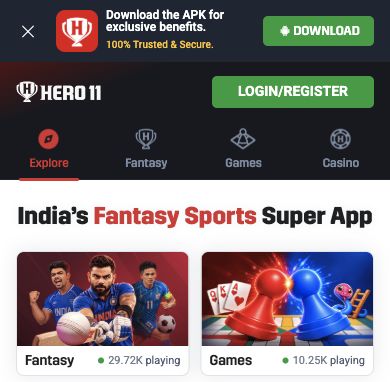
A first visit to a sports website is easier when its navigation makes sense. Hero11 introduces itself with an India-focused fantasy sports description, a trophy-style HERO11 logo and a dark header. A bright green Login/Register button sits apart from the content, making the account entry easy to distinguish from a match card.
Under the header, the main destinations are Explore, Fantasy, Games and Casino. On Explore, prominent Fantasy and Games panels provide two visual starting points. This article follows the sports route and explains the account and device controls around it; the other catalogues have their own content and rules.
For readers familiar with our COME app guides, the useful habit is the same: identify the section before interpreting the screen. Hero11 is a different brand name. Similar colours, controls or category labels are not evidence that accounts, settings or service arrangements transfer between brands.
Reading the match card from top to bottom
The reviewed card layout places a format and competition label above the two teams. Team abbreviations and names sit in the body, while a displayed time and countdown help explain when the event is due to begin. This hierarchy lets you identify the event before reading any activity-specific details.
- Competition: confirm which tournament or series the card refers to.
- Teams: read both names rather than relying on a badge or abbreviation.
- Timing: compare the displayed start information with the date and time zone relevant to you.
- Activity: read the current explanation for the option inside that fixture.
Above the fixtures, Suggested Predictions uses question cards with Yes and No controls. A question card is not a scorecard, and a fixture card is not proof of a video stream. The labels tell you what kind of screen you are viewing; the detail page must supply the rest.
The live list changes, so screenshots are best used to learn the layout. Do not treat a countdown, match selection or numerical claim in an older image as current information.
The Login/Register screen is a separate step
Hero11 gives account access its own screen. The saved mobile example shows a red header, a single Email/Mobile No. field, a Continue control, a close icon and a headset symbol. The field asks visitors to omit the country code. In the empty example, Continue is disabled.
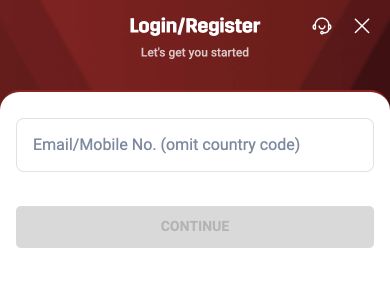
For a returning visitor, the important distinction is between finding the login control and recovering an account. An introductory guide can show the first step, but it cannot confirm the verification method or account outcome for an individual user. Follow the current on-screen process and keep private verification information out of public community channels.
The visible entry field also should not be confused with a download button. Logging in, choosing a section and installing an Android package are separate actions.
Website navigation and the Android banner
The reviewed mobile presentation includes an Android APK banner above the main header. Its placement is useful to understand: it belongs to app access, while the tabs below it control website content. You do not need to confuse a browser visit with a completed installation.
An APK is an Android package and does not install as an iPhone app. Our public-interface review did not test a Hero11 installation or certify a particular file, version, device requirement or download speed. Read the information attached to the actual file if you later choose that route, and keep your device’s security protections enabled.
When comparing desktop and phone layouts, concentrate on the labels and content hierarchy. Cards may fit differently across screen widths, but the distinction between the top navigation, sport tabs and account control remains the most useful way to understand the page.
A useful companion while you explore
For a more detailed explanation of website entry points and device options, Hero11.games offers an independent guide to the brand’s navigation, login screen and public channels. Its role is informational: it links onward to the Hero11 platform and does not itself manage accounts or payments.
Within the Fantasy interface, the reviewed help labels included How to Play, Points System and Help and Support. Home, Predictions and My Matches appeared in the lower navigation. These labels separate general browsing, question-based content and personal records, helping a visitor return to the right area.
If you are still learning the equivalent layout on COME, our COME section guide explains its own Fantasy and Sports areas. Use each guide for its named brand and check the current interface when moving between services.
Before you move beyond browsing
Is Hero11 just a news or live-score website?
The reviewed interface presents Fantasy alongside Games and Casino. This tour describes the public navigation; it does not classify every activity as news, streaming or a free game.
Does a familiar Fantasy label mean familiar rules?
No. Look at the specific format and its current explanation. A shared word does not establish team size, scoring, eligibility or account compatibility.
What did this review verify?
We checked the public website’s navigation on 24 October 2026 and used dated, empty-account interface examples. We did not register, test transactions or verify individual contest outcomes. Restricted activities require the platform’s current adult eligibility and location checks.